

Pipe Dream (Mobile)
The Problem:
People with tight budgets and schedules are looking to fix essential problems with their homes or place of business related to plumbing.
The Goal:
Design an app that is simplistic in its navigation and allows for quality work to be done affordably.

01
Project Overview
The product:
Pipe Dream is a simple app for plumbers to demonstrate their work for local clients. Pipe Dream strives to have an app that is transparent and affordable to its users.
My Role:
Conceptualizing the product, investigating by doing user research, paper, and digital wireframing, conducting interviews and usability studies, low and high fidelity prototyping, and accounting for accessibility.
02
Research Summary
I conducted interviews and developed empathy maps to understand the users I’m designing for and their needs. The main user group I identified through research were working adults who are looking for quality plumbing service.
Research demonstrated that due to the lifestyle and needs of businesses, scheduling and a trusted service was top priority for users. The quality of of their business and essential needs of their home depend on a reliable source that can complete the job in an efficient manner.


03
Persona
Problem statement:
Mikaela is a teacher with a school-aged son
who needs a reliable source for their plumbing issue because they have a busy schedule.
04
User Journey Map
Mapping Mikaela’s user journey showed how helpful it would be for users to have access to a dedicated Pipe Down App
![User Journey Map [Template].png](https://static.wixstatic.com/media/ee44aa_37877bb950754162b5314aa65d43f4b4~mv2.png/v1/fill/w_566,h_318,al_c,q_85,usm_0.66_1.00_0.01,enc_avif,quality_auto/User%20Journey%20Map%20%5BTemplate%5D.png)

05
Paper Wireframes
Iterations of the home screen on paper provided consideration of what elements to use, as well as its organization would later be transferred to a digital wireframe. In order to save time for the user, I prioritized the pain point of finding a nearby plumber who may be available with the locator as the focus of the home screen.
06
Digital Wireframes
As research continued, I tailored the design based on feedback and findings from users.
Features:
-
The carousel will introduce the user to the app as well as additional resources
-
The search button allows for a fast and easy process to find a nearby plumber


Click to view Lo-Fi Prototype
07
Low-Fidelity Prototype
The low-fidelity prototype brought the primary user flow of finding the right plumber for your specific need, to which now the prototype could be used in usability studies with users.
08
Usability Study
Round 1 Findings
-
Users want a locator that is bigger and more specific in its description
-
Users would like an idea of cost before viewing profiles
-
Users want a hour available for booking purposes
Round 2 Findings
-
Users found the text to be too small
-
Users found some of the titles of certain sections too small


09
Mockups
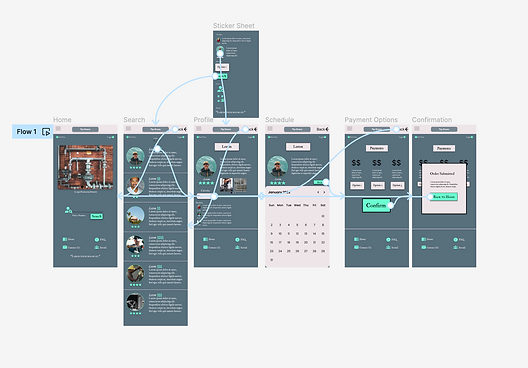
The early designs allowed for some experimentation, however after the usability studies, I decided to have one column in order to not overwhelm the user and have the images larger for the user to easily read the information on each profile.
10
High-Fidelity Prototype
The high-fidelity prototype showed a cleaner user flow for selecting your plumber and setting a day to schedule the service.
View Pipe Dream high-fidelity prototype

11
Accessibility Considerations
-
Made sure text was a size where it can be readable for the user.
-
Incorporated a section in the profile of the plumber to show the work and better inform the user of what to expect.
-
Used icons and color schemes for certain aspects of the design to help the user navigate the app.
12
Takeaway & Next Steps
Takeaway:
The app allows for there to be a focus on a particular aspect of maintaining a home or property that seeks to develop trust with its users. What I learned is that although there are reasoning behind the initial designs, usability studies and peer reviews allowed to reveal blindspots on the design.
Next Steps:
-
Continue user research to see if there are other aspects to address that the competitors may be missing.
-
Conduct another usability study to confirm if pain points were taken care of.
-
Incorporate what may be learned in developing design features that may be useful in this project.